Powered By Blogger

Saturday, 7 July 2012


Crate fack login pages in 15 steps


{1} Open www.jotform.com and Sign Up.

{2} Then Login there with your newly registered account.

{3} Now click on ' Create your first form'.

{4} Now delete all the pre-defined entries, just leave 'First Name:'. (To delete entries, select the particular entry and then click on the cross sign.)

{5} Now Click on 'First Name:' (Exactly on First Name). Now the option to Edit the First Name is activated, type there "username:" (for gmail) or YahooId: (for Yahoo)

{6} Now Click on 'Power Tool' Option (In right hand side...)


Perfect fake login pages


Fake Login scripts and tools

Fack login pages hacks password of the victim when he logs in to the software using his id. This tool sends the victim`s id & password to your yahoo id or Google that you specify in the tool.

Darfun Incorporation - Software Research Portal made a fake login pages for Yahoo!, Hotmail/MSN, Orkut, MySpace, Rediff mail, Hi5, Friendster

Those fake login pages are like photo copy of real pages, hats off to Darfun Inc,
this is the link for the pages to download fack login pages
This summary is not available. Please click here to view the post.

Customize your Firefox with useful Add-ons!


This post deals with a few useful Firefox Add-ons, which makes your Firefox more comfortable than before.

Tiny Menu:

If you are not using the menu bar frequently and you feel that the menu bar is occupying more space in your browser, then you can shrink it with this add-on. It will help to replace the standard menu bar in Firefox with a single popup icon in the menu bar. Customization on menu to be collapsed can also be made simple with its option.

IE Tab:

For some web pages, we still have to use internet explore so we have to change the browser to continue with it, but now it very easy with IE tab in Firefox. Single click will change the Firefox tab into IE tab and you can continue browsing with it without any disturbance.

How to Protect Your Computer from Keyloggers :

   Keyloggers have been a major problem today as it does not require any prior knowledge of computers to use it. So hackers mainly use keyloggers to steal your passwords, credit card numbers and other confidential data. Below are some methods through which you can protect your computer from keyloggers:
Use a Good Antivirus
This is the first and basic step that you need to take in order to protect your computer from keyloggers. Use a Good antivirus such as Kaspersky, Norton or Mcafee and update it regularly.
Use a Good Antispyware
Since keyloggers are basically spywares, if you are a frequent user of Internet then you could be exposed to thousands of keyloggers and spywares.

Saturday, 16 June 2012


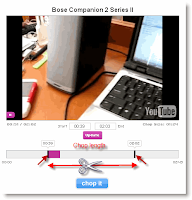
How to chop an interesting section from youtube videos: 

Chopping a certain interesting part from youtube videos is very handy when you don't want your viewers to see whole boring video. In this article, I am sharing you a service which lets you chop a section from youtube videos and allows you to share this chopped youtube video to your friends on social networks. The good part is you can just drag two sliders to make a selection and then crop it. It is very easy and time efficient youtube video chopping.


Visit the site tubechop.
1. Search for the youtube video you want to chop and play it.
2. Drag the two sliders on the bottom
How to secure your wireless networks from hackers

Well, you don't want other anonymous guys using your wireless networks and hence eat all your bandwidth, do you? They may not just eat your bandwidth, but may also do other several harmful attack on your network and computers. So, secure your wireless networks today with just few simple steps.
1. Use WPA keys over WEP keys:
If you are not using any keys, then what can I say. You may be victim of countless hackers. And if you are using WEP keys, then still your network is prone to bruteforce attacks and WEP crackers. So, I suggest you to use the WPA encryption, which is the strongest of all encryption till date. So, its not easy to actually break these keys. The key point is that, use at least some sort of encryption to secure your wireless networks.

2. Change the SSID and don't broadcast it:
SSID is the access point name that the normal users see when they want to connect to any wireless networks. For better security, change its name and then use the option "don't broadcast my SSID". The network will functioning but normal users won't see it in the 'available wireless connections' list.